Agents
VibePod manages each agent as a Docker or Podman container. Credentials and config are persisted on your host — at ~/.config/vibepod/agents/<agent>/ for the default profile — and mounted into the container on every run, so you only need to authenticate once. To keep several credential sets per agent (subscription vs. API key vs. Ollama, stored under ~/.config/vibepod/profiles/<name>/), see Credential Profiles.
Supported Agents
| Agent | Provider | Shortcut | Image |
|---|---|---|---|
claude |
Anthropic | vp c |
vibepod/claude:latest |
gemini |
vp g |
vibepod/gemini:latest |
|
opencode |
OpenAI | vp o |
vibepod/opencode:latest |
vibe (alias: devstral) |
Mistral | vp d |
vibepod/devstral:latest |
auggie |
Augment Code | vp a |
vibepod/auggie:latest |
copilot |
GitHub | vp p |
vibepod/copilot:latest |
codex |
OpenAI | vp x |
vibepod/codex:latest |
pi |
Earendil | vp pi |
vibepod/pi:latest |
agy (Antigravity) |
vp n |
vibepod/agy:latest |
|
tau |
Hugging Face | vp t |
vibepod/tau:latest |
jcode |
1jehuang | vp j |
vibepod/jcode:latest |
freebuff |
CodebuffAI | vp fb |
vibepod/freebuff:latest |
qwen |
Qwen (Alibaba) | vp q |
vibepod/qwen:latest |
dsh (DeepSeek Harness) |
DeepSeek | vp ds |
vibepod/dsh:latest |
hermes |
Nous Research | vp h |
vibepod/hermes:latest |
Alias note: vp run devstral resolves to vp run vibe, vp run qwen-cli
resolves to vp run qwen, and vp run deepseek / vp run deepseek-harness
resolve to vp run dsh.
DeepSeek Harness (dsh) — Web UI agent
dsh is Web-UI-first: vp run dsh starts the harness's browser UI and prints
its URL (default http://127.0.0.1:3080, published loopback-only on the
host). The terminal stays attached to the container logs; Ctrl+C stops it.
Sessions, profiles, plugins, and credentials persist in the agent config dir
(~/.config/vibepod/agents/dsh/, mounted as the container's home).
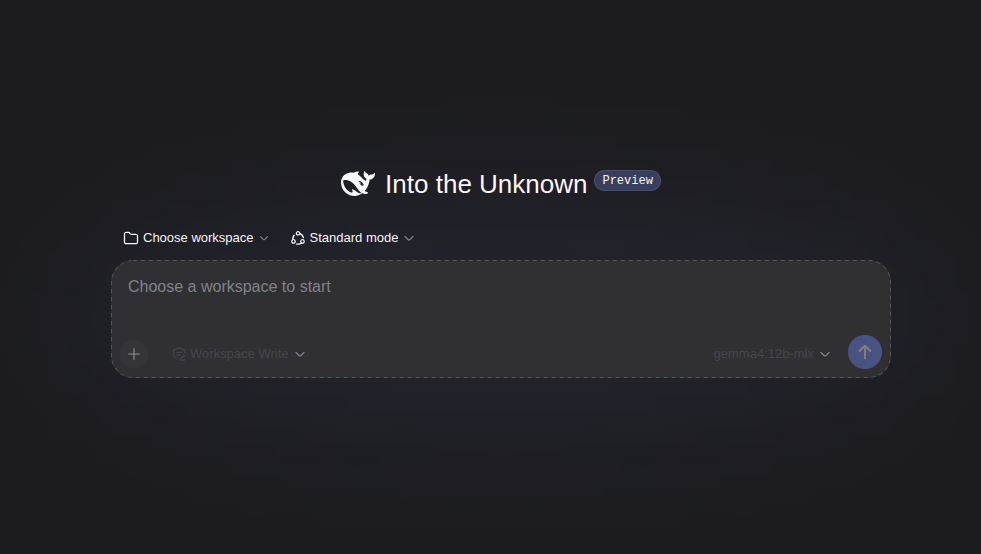
Developer preview: upstream warns of compatibility-breaking changes. The default
vibepod/dshimage pins an exact harness (npm) version — the:latestdocker tag refers to the image build, not the harness inside. VibePod prints a preview notice on every run.
First-run setup (one time): the Web UI needs a workspace and a model before the first session; both persist in the agent config dir.
- Open the printed URL and click the workspace path in the top bar (or
Choose workspace). Navigate to
/workspace— the project mount — via the root breadcrumb or the path editor, and select it. Don't use the new-folder input:/workspacealready exists, and the input only accepts a single folder name. Every project is mounted at/workspace, so this registration carries over to all of them. - Configure a model under Settings → Models (see below).
Auth: enter a DeepSeek API key in the Web UI (Settings → Models) — it persists across restarts — or pass it from the host:
Other providers: no DeepSeek account is required. Any OpenAI-compatible
endpoint works — in Settings → Models pick the openai provider, set a
custom base URL (e.g. a local Ollama server), fill in
any non-empty token if the endpoint doesn't check one, and enter the model
name manually.
Headless one-shot (uses dsh's headless profile, no server, prints the
final answer):
Changing the host port: override the published port in your config; the
container-side port stays 3081 (the image's internal forwarder):
For a one-off run, the -p/--publish flag
replaces the configured list instead:
A host port of 0 (e.g. 127.0.0.1:0:3081) lets the Docker daemon pick a
free port — useful for running dsh in several projects at once; the printed
Web UI URL shows the assigned port.
dsh's browser-trust fence expects the canonical authority; on a non-default
host port also pass vp run dsh -- --trusted-host 127.0.0.1:3090 (with the
actual port when the daemon assigned one).
Customizing: dsh composes profiles from patch layers. Edit
~/.config/vibepod/agents/dsh/.dsh/cordis.patch.yml on the host — changes
hot-reload into the running server.
Per-project state and the shared /workspace path
For ordinary interactive and task launches, every project is mounted at
/workspace, and an agent's config dir is shared
by all projects (per agent and profile, not per project).
Agents that key per-project state by the working directory path therefore
see every project as the same project.
Claude: memory and sessions
Claude Code stores auto memory
and session transcripts under <config dir>/projects/<project>/, where
<project> is derived from the repository path. In a VibePod container that is
always projects/-workspace (on the host:
~/.config/vibepod/agents/claude/projects/-workspace/ for the default profile).
Named profiles use
~/.config/vibepod/profiles/<profile>/agents/claude/projects/-workspace/
(see profile layout). Use your VP_CONFIG_DIR root
instead of ~/.config/vibepod if configured. So, by default:
- memories saved in one project are loaded in every other project, and
claude --continuecan resume the latest conversation from another project, whileclaude --resumeopens a picker with sessions from all projects.
vp run claude --acp is not affected: the editor's session cwd is the host
path, so the key differs per project.
There are two independent fixes. Use either one, or both.
The workspace-memory example below is for non-ACP launches; in ACP mode use
the workspace's absolute host path instead of /workspace.
Keep memory in the repository with Claude Code's autoMemoryDirectory
setting, in the project's .claude/settings.json (or
.claude/settings.local.json to keep it out of the shared file):
Merge this key into the existing JSON object, preserving your other settings;
do not replace the file with the example. Claude Code reads this setting from
user, project, local, managed policy, and --settings scopes. A user-scope
setting pointing at /workspace/.claude/memory also applies to every ordinary
VibePod Claude launch using that config directory.
The value must be an absolute path or start with ~/; relative paths such as
.claude/memory are not supported. For ordinary launches use the container path
/workspace/...; for ACP launches use the absolute host workspace path described
above. Claude Code applies the project-scope
value under the same workspace-trust rule as hooks, and ignores a
repository-supplied value while permissions.blockReadsOutsideWorkingDirectories
is on. The memory then lives
with the code and survives a reset of the agent config dir. Session transcripts
stay in the config dir.
Memory in the workspace gets committed
.claude/memory/ is an ordinary directory in your repo. Unless you add
.claude/memory/ to .gitignore, git add -A commits whatever Claude
remembered, including notes about you and your preferences. Commit it on
purpose (shared team memory) or ignore it.
For private memory, add this entry to the repository's .gitignore:
Ignoring the directory does not untrack memory files already committed; remove those files from Git's index separately if you want to stop sharing them.
To check the setup, start vp run claude from the project directory, trust the
workspace, and open /memory. Confirm that the auto memory folder is
/workspace/.claude/memory and that auto memory is enabled. Ask Claude to
remember a project-specific fact,
then check .claude/memory/ on the host. Exit and start a new session to check
recall. Repeat in a second repository with the same setting and profile to
confirm that each repository has its own memory files. Changing the directory
does not migrate existing notes; see the migration guidance below.
Give each project its own key with
CLAUDE_CODE_PROJECT_DIR_NAME
(Claude Code ≥ 2.1.234). It moves both memory and transcripts to
projects/<name>/ in the config dir, so nothing is written to the repo. Set it
in the project's .vibepod/config.yaml:
# .vibepod/config.yaml
agents:
  claude:
    env:
      CLAUDE_CODE_PROJECT_DIR_NAME: my-project   # 1-64 letters, digits, - or _
VibePod already sets CLAUDE_CONFIG_DIR=/claude, which Claude Code requires
for the custom key to take effect. Avoid Windows device names such as con;
Claude ignores invalid names and falls back to the derived path. Set the key
through VibePod's environment configuration, as above, rather than the env
object in Claude's settings: Claude reads this key before loading settings.
Launch from the project directory so VibePod reads its .vibepod/config.yaml.
--workspace selects the mount but does not change where VibePod loads project
configuration. To launch from elsewhere, pass the key explicitly:
Pick a unique name per project within each profile. Existing memory is not
moved automatically. Copy only that project's notes from
projects/-workspace/memory/ to projects/my-project/memory/ under the active
profile's Claude config directory:
- Default profile:
~/.config/vibepod/agents/claude/. - Named profile:
~/.config/vibepod/profiles/<profile>/agents/claude/.
For workspace memory, copy the selected notes into .claude/memory/ instead.
Use your VP_CONFIG_DIR root if configured.
This is intentionally documentation-only: VibePod adds no agents.claude.memory
option and sets neither option for you. autoMemoryDirectory would mean writing
to your repository's .claude/settings.json, and whether to commit memory is
your call. A per-project key set by default would leave existing memory and
sessions behind under -workspace.
The custom key separates the default project scope, but is not an access
boundary: Claude's session picker can still show all project directories with
Ctrl+A, and --resume <session-id> can open a session stored under another key.
Other agents
The table below covers ordinary interactive and task launches at /workspace.
ACP launches instead use the absolute host workspace path as their container
working directory, separating cwd-based state across projects. Several agents
also key per-project state by cwd:
| Agent | Shared across projects at /workspace |
Per-project workaround |
|---|---|---|
codex |
codex resume --last / the resume picker (sessions are filtered by cwd); folder trust in config.toml [projects."/workspace"] |
CODEX_HOME (moves auth too) |
gemini |
--resume chats, checkpoints, shell history, project memory (~/.gemini/tmp/<project_hash>/); trusted folders |
GEMINI_CLI_HOME (moves auth too) |
qwen |
--resume / --continue sessions (~/.qwen/projects/-workspace/); shell history (~/.qwen/tmp/<project_hash>/); trusted folders (trustedFolders.json) |
QWEN_RUNTIME_DIR isolates conversations, logs and todos only; QWEN_HOME isolates global state (moves auth too) |
copilot |
trusted folders and saved tool approvals; --continue likely (unverified) |
COPILOT_HOME (moves auth too) |
auggie |
--continue / --resume / session list |
--augment-cache-dir flag |
opencode |
only non-git projects (sessions are keyed by the repo's root commit) | git init, or XDG_DATA_HOME |
Set the env var in the project's .vibepod/config.yaml under
agents.<agent>.env, as in the Claude example above. Point it at a
per-project path inside the agent's config dir, for example
QWEN_RUNTIME_DIR: /qwen/runtime/my-project (qwen's config dir is mounted at /qwen).
Qwen's runtime directory
does not relocate folder trust or shell history; use a separate QWEN_HOME
for those too. Gemini's project state
uses a hash of the project root, not a literal workspace directory.
Variables that move the whole home also move credentials, so you have to log
in again for that project. Launch from the project directory to load these
project env settings, or pass them explicitly with vp run -e KEY=value.
First run & authentication
Start any agent for the first time with vp run <agent>. The container will prompt you to authenticate (browser OAuth, API key entry, or device flow depending on the provider). Once authenticated, credentials are written to the persisted config directory and reused on subsequent runs.
Auto-pulling the latest image
VibePod automatically pulls the latest image for an agent before every run and shows pull progress while layers download. This ensures you always start with the most up-to-date container without manual intervention.
To disable auto-pull globally:
Or for a specific agent only:
Per-agent auto_pull takes precedence over the global setting. For example, you can disable it globally but keep it on for a specific agent:
auto_pull: false          # skip pull by default
agents:
  claude:
    auto_pull: true       # except claude — always pull
You can also force a one-off pull via the CLI flag regardless of config:
The resolution order is: --pull flag > per-agent auto_pull > global auto_pull.
Overriding the image
You can point VibePod at a custom image via an environment variable:
Or permanently via your global config:
Image customization workflows
VibePod has a fixed set of supported agent IDs (claude, gemini, opencode, vibe, auggie, copilot, codex, pi, agy, tau, jcode, freebuff, qwen, dsh, hermes). The CLI also supports the aliases devstral (→ vibe), qwen-cli (→ qwen), and deepseek / deepseek-harness (→ dsh). Image customization means changing the image used for one of those IDs.
1. Extend an existing image for an agent
Example: add tools to the default Claude image.
- Create a Dockerfile that extends the current base image.
# Dockerfile.claude
FROM vibepod/claude:latest

# Add project-specific utilities.
RUN apt-get update \
  && apt-get install -y --no-install-recommends ripgrep jq \
  && rm -rf /var/lib/apt/lists/*
- Build and tag the derived image.
- Run with the new image (one-off) or set it in config (persistent).
# ~/.config/vibepod/config.yaml (or .vibepod/config.yaml)
agents:
  claude:
    image: myorg/claude-container:with-tools
2. Add a new image for an agent
Example: point opencode at a newly published internal image.
- Build/publish your image to a registry (for example
registry.example.com/team/opencode:2026-03-01). - Attach that image to the target agent in config.
- Start the agent.
You can also test quickly without editing config:
Passing environment variables
Use -e / --env to inject variables at runtime:
Persistent per-agent env vars can also be set in config:
Passing arguments to the agent
Any extra arguments after the agent name are appended to the agent command inside the container:
Use -- before agent flags so VibePod does not parse them as its own options:
For concrete syntax, check the agent's own CLI help. For example, Claude and Codex both accept model flags, but their exact flag names and values differ.
Init scripts before startup
Use agents.<agent>.init to run shell commands in the container before the agent launches. This is useful for installing extra tools in a custom image workflow.
The init commands run on every vp run for that agent and must be idempotent.
IKWID mode (--ikwid)
Use --ikwid to enable each agent's built-in auto-approval / permission-skip mode when supported.
| Agent | --ikwid appended args |
|---|---|
claude |
--dangerously-skip-permissions |
gemini |
--approval-mode=yolo |
vibe |
--auto-approve |
copilot |
--yolo |
codex |
--dangerously-bypass-approvals-and-sandbox |
pi |
--approve |
agy |
--dangerously-skip-permissions |
opencode |
Not supported |
auggie |
Not supported |
tau |
Not supported |
jcode |
Not supported |
freebuff |
Not supported |
qwen |
--approval-mode=yolo |
dsh |
Not supported |
hermes |
--yolo |
Example:
Pasting images (--paste-images)
Agents that accept pasted screenshots need access to your clipboard, which lives
on the host X server. Use --paste-images to forward it:
VibePod mounts the X11 socket (/tmp/.X11-unix), passes your DISPLAY, and
prepares an X authority cookie for the container. Host cookies are bound to the
host's hostname, which the container does not share, so VibePod rewrites the
cookie to the wildcard address family and mounts it read-only at
/tmp/.vibepod-xauth. Without that rewrite the X server answers with
"Authorization required, but no authorization protocol specified".
Requirements and caveats:
DISPLAYmust be set; otherwise VibePod warns and starts without forwarding.- The
xauthbinary must be available on the host, otherwise the cookie cannot be prepared and clipboard access may be rejected. - X11 only (including XWayland). There is no Wayland-native or macOS clipboard forwarding.
- Forwarding the X socket lets the container talk to your X server; only use it with agents you trust.
Detached mode
Use -d / --detach to start an agent container in the background without attaching your terminal. The agent process starts immediately inside the container — -d only controls whether VibePod attaches your terminal to it.
Basic usage
The command prints the container name and returns immediately. You can also find it later with:
Interacting with a detached container
The agent is already running inside the container. You can exec into it to inspect state, install extra tools, or interact with the agent alongside its running process:
Use the container name printed by vp run -d or shown in vp list.
Tip
If you need to run setup commands before the agent launches, use agents.<agent>.init or extend the base image instead — these run inside the container before the agent process starts.
Managing detached containers
Check running agents:
vp list              # shows running + configured agents
vp list --running    # shows only running agents
vp list --json       # machine-readable output
Each row shows the container's credential profile and, when
the container was launched with --provider, the injected provider names
(comma-separated for multiple) in the PROVIDER column.
When the current project has overlays, vp list adds a
Project Overlays table naming the overlay image each agent resolves to and
whether it is already built.
Stop a specific agent, a single container, or all agents:
vp stop claude                       # stop every container for the `claude` agent
vp stop vibepod-claude-a1b2c3d4      # stop one specific container (from `vp list`)
vp stop claude -f                    # force stop immediately
vp stop --all                        # stop every VibePod container
The argument is resolved as an agent name/shortcut first; anything else is looked up as a container name or ID. Only VibePod-managed containers can be stopped this way.
Caveats
auto_remove(default:true) — By default, containers are automatically removed when they stop. This means you cannot restart a stopped detached container; you need tovp runagain. Setauto_remove: falsein your configuration if you want stopped containers to persist.- Session logging — Sessions started with
--detachare not recorded in the VibePod session log since VibePod does not capture the interactive I/O. If you need session logging, run without--detach.
Task mode (headless)
Run an agent non-interactively as a background task. Claude calls this "headless mode"; codex and auggie expose equivalent flags. VibePod wraps them in a uniform vp task command.
vp task create claude "Summarize the README"
# ✓ Task started: 9f1e8a20b4c14e2f89d7f6a1c3e42b99
#   container: vibepod-claude-abcdef12
#   follow:    vp task logs 9f1e8a20b4c1 --follow
The command starts a detached container, writes a row to ~/.config/vibepod/tasks.db, and returns a task id. The container is not auto-removed, so you can inspect logs and exit status after it finishes.
Task mode applies a finite timeout by default: 2 hours. Override it per task with --timeout 30m, --timeout 4h, or another s/m/h duration. Use --timeout none only when you explicitly want an unlimited background task.
Supported agents (v1)
| Agent | Invocation inside container |
|---|---|
claude |
claude -p "<prompt>" |
codex |
codex exec "<prompt>" |
auggie |
auggie --print "<prompt>" |
tau |
tau -p "<prompt>" |
jcode |
jcode run "<prompt>" |
qwen |
qwen -p "<prompt>" |
dsh |
dsh --profile headless "<prompt>" |
hermes |
hermes -z "<prompt>" |
pi |
pi --mode json -- "<prompt>" |
Other agents error with a clear message; support can be added by setting headless_prefix (or headless_command for agents whose one-shot invocation differs from their interactive command) on their AgentSpec.
Managing tasks
vp task list                     # recent tasks + container status
vp task list --agent claude      # filter
vp task list --json              # machine-readable

vp task logs <id>                # dump captured stdout/stderr
vp task logs <id> --follow       # stream

vp task status <id>              # state, exit code, timestamps
vp task cancel <id>              # gracefully stop a running task, keeping logs
vp task rm <id>                  # remove task + its (stopped) container
vp task rm <id> -f               # kill running container before removing
vp task rm --all                 # remove all stopped/finished tasks
vp task rm --all -f              # kill running task containers and remove all tasks
Task ids can be abbreviated to any unique prefix (e.g., the first 12 chars shown by vp task list).
Passing agent flags
Anything after -- is forwarded to the agent's command after the prompt, matching the CLI's documented form (claude -p "..." --allowedTools ...):
vp task create claude "review staged changes" -- --output-format json
vp task create --timeout 30m claude "run the fast audit"
vp task create --timeout none claude "wait for the external job"
Auto-approval for automation
Headless tasks typically need to run without permission prompts. Pass --ikwid to apply the agent's documented auto-approve flag (e.g., --dangerously-skip-permissions for Claude):
Codex task authentication
codex exec reuses saved Codex login state from the mounted config directory when available. For automation and smoke tests, pass CODEX_API_KEY explicitly:
vp task create -e CODEX_API_KEY="$OPENAI_API_KEY" --ikwid codex \
  "Print exactly TASK_OK_CODEX and exit."
For compatibility, Codex task mode also maps an explicitly supplied OPENAI_API_KEY to CODEX_API_KEY when CODEX_API_KEY is not already set.
Caveats
- No
--resumein v1. Task mode starts a fresh session every time. Use the agent's own resume flag via passthrough (-- --resume <session_id>for Claude) if you need continuity. - LLM config model flag is skipped in task mode.
llm.base_url/llm.api_key/llm.modelare still injected as env vars, but the--model-style CLI flag is not appended — different agents place it differently relative to subcommands. Pass an explicit model via--. - Default timeout: 2 hours. On timeout, VibePod gracefully stops the container and records the task as failed. Pass
--timeout noneto opt out for one task. - Task containers are not auto-removed. Run
vp task rm <id>when you're done inspecting one task, orvp task rm --all -fto clean up every recorded task and its container.
Reattaching a terminal
Closing the terminal window that runs vp run does not stop the container — the agent keeps running in the background under Docker. This is by design: the container's lifecycle is tied to Docker, not to your shell. Use it as a feature when you want to keep a long-running session alive across terminal restarts.
To rejoin a running container:
If exactly one managed container is running you can omit the name:
vp attach only works for containers that are already running and managed by VibePod. When you are done, close the terminal to leave it running, or stop it explicitly with vp stop <container>, vp stop <agent>, or vp stop --all.
Resume hints after a session ends
Several agents print their own resume instruction when they exit — Claude, for example:
When VibePod recognizes such a hint in the session output (supported for Claude, Codex, Pi, Copilot, Jcode, and Freebuff), it prints the equivalent VibePod command after the agent exits:
The suggested command wraps the agent's own resume arguments in passthrough
form (after --), so it works because each agent's session state lives in the
persisted config mount. If no hint is recognized, exiting behaves as before and
nothing extra is printed.
Connecting to a Docker Compose network
When your workspace contains a docker-compose.yml or compose.yml, VibePod detects it and offers to connect the agent container to an existing network so it can reach your running services.
You can also specify the network explicitly:
Individual agents
Claude (Anthropic)
Credentials are stored in ~/.config/vibepod/agents/claude/. On first run, Claude's interactive setup will guide you through API key configuration.
Long-lived token (recommended)
Claude Code has a known upstream bug where OAuth access tokens (~8 h TTL) are not automatically refreshed from disk, forcing users to run /login roughly once per day. See Why this workaround exists below for the full bug history and links.
VibePod works around this by storing a ~1-year long-lived token on the host and injecting it as CLAUDE_CODE_OAUTH_TOKEN on every run. This sidesteps the refresh path entirely.
This is an official authentication method
claude setup-token and the CLAUDE_CODE_OAUTH_TOKEN environment variable are both documented by Anthropic as a supported authentication path for CI pipelines, scripts, and other environments where an interactive browser login isn't available. See the official Claude Code authentication docs and the claude-code-action setup guide. VibePod just automates the storage and injection.
One-time setup:
This starts the container with claude setup-token, which opens Anthropic's OAuth flow in your browser. After you authorise, the container prints a token. VibePod then prompts you to paste it and saves it to:
Subsequent runs:
VibePod detects the stored token and injects CLAUDE_CODE_OAUTH_TOKEN automatically. Look for Using stored Claude OAuth token in the startup output to confirm.
Precedence (first match wins):
-e ANTHROPIC_API_KEY=...or-e CLAUDE_CODE_OAUTH_TOKEN=...passed on the CLIANTHROPIC_API_KEYorCLAUDE_CODE_OAUTH_TOKENset in your per-agentenv:config- Stored
oauth-tokenfile - Interactive OAuth via
.credentials.json(subject to the refresh bug)
Verifying the token is stored:
Shows credentials state, stored-token presence and mtime, and which auth mode the next run will use. You can also inspect the file directly:
ls -l ~/.config/vibepod/agents/claude/oauth-token
# or to view contents (treat as a secret — do not share):
nano ~/.config/vibepod/agents/claude/oauth-token
Verifying the token works:
-p runs Claude Code in headless mode — one API call, one response. If you see "ok", the token is valid.
Caveats:
- The long-lived token is inference-only — it cannot establish Remote Control sessions (steering a container from claude.ai/code or the mobile app).
claude setup-tokenrequires a Pro, Max, Team, or Enterprise plan. Console (pay-per-token) accounts should useANTHROPIC_API_KEYinstead.- The token rotates roughly once a year. When it expires, just run
vp run claude setup-tokenagain.
Using an API key instead
If you're on a Console (pay-per-token) account, set ANTHROPIC_API_KEY and skip the setup-token flow entirely:
Or permanently in config:
Diagnostics
vp doctor claude is the first tool to reach for when auth misbehaves. It reports:
.credentials.json— file owner/mode,expiresAt, presence ofrefreshToken, scopes, subscription type.claude.json— mtime cross-check- Stored long-lived token state
- Which host env vars (
ANTHROPIC_API_KEY,CLAUDE_CODE_OAUTH_TOKEN,CLAUDE_CONFIG_DIR) are set - Effective auth mode — what the next
vp run claudewill actually use
Exit codes: 0 healthy, 1 config dir missing, 2 OAuth token expired (useful in scripts).
Why this workaround exists
The root cause is in Claude Code itself, not in VibePod. The OAuth refreshToken is stored in .credentials.json but never used: the access token is loaded from disk, sent as-is until it 401s, and nothing is written back when a refresh would have succeeded. The bug affects native Linux, WSL, macOS, and every container-based deployment equally.
Community forensics (#33995 comment):
Set
expiresAtin~/.claude/.credentials.jsontoDate.now()to force expiry. Send a message — Claude processes it successfully, meaning the in-memory token refresh worked. Check~/.claude/.credentials.jsonafterward — file was never written. Conclusion:refreshOAuthTokensucceeds and returns new tokens, but the credential store'supdate()is never called (or silently fails) after a successful refresh. The new token lives only in memory. Next session launch reads the stale expired token from disk and requires re-login.
The community-validated workaround (#24317 comment) is exactly what VibePod implements:
I worked around this using
claude setup-tokenand then feeding it in as theCLAUDE_CODE_OAUTH_TOKENenvironment variable. It skips all the "OAuth tokens invalidating each other", but has the downside that it doesn't allow/usage.
claude setup-token itself is an officially supported Claude Code authentication path, documented for exactly this kind of non-interactive deployment. See Anthropic's authentication guide and the claude-code-action setup guide — the same mechanism used by Anthropic's own GitHub Action.
Upstream tracking issues — core bug (access-token not refreshed from disk):
| # | Status | Summary |
|---|---|---|
| #50743 | open · has repro · area:auth |
Newest and cleanest repro on headless Linux — refreshToken ignored |
| #42904 | closed as duplicate | Canonical "daily re-login required for subscription users" report |
| #40985 | open · stale |
"Auth tokens expire too frequently" — confirms ~8 h TTL |
| #33995 | closed not-planned | Best technical forensics (quoted above); proves write-back is the broken step |
| #21765 | closed not-planned | First clear statement: "Claude Code doesn't use refresh tokens to get new access tokens" |
| #12447 | open | OAuth expiry disrupts autonomous workflows; refresh token handling needed |
| #37402 | open | --print / automation mode also affected |
Multi-session race condition (why a shared .credentials.json across simultaneous sessions makes things worse):
| # | Status | Summary |
|---|---|---|
| #24317 | open · has repro · 18 comments |
Canonical thread; documents refresh-token rotation and single-use semantics |
| #48786 | closed as dup of #24317 | Independent reproduction |
| #27933 | closed | Early race-condition report |
| #45129 | closed as dup | Agent worktree subprocesses hit this constantly |
Container / headless specifically:
| # | Status | Summary |
|---|---|---|
| #22066 | closed as duplicate | OAuth authentication not persisting in Docker |
| #34917 | closed | OAuth "Redirect URI not supported" in headless/Docker |
| #34141 | closed | Claude Code ignores ANTHROPIC_API_KEY when OAuth redirect fails in devcontainers |
| #7100 | closed not-planned | Request for official headless-auth documentation |
| #22992 | open | Feature request: RFC 8628 device-code flow for headless |
Proxy / Cloudflare interaction (relevant if you run vibepod behind the built-in mitmproxy):
| # | Status | Summary |
|---|---|---|
| #47754 | open · area:auth · platform:linux |
Cloudflare WAF blocks OAuth token refresh from headless Linux servers |
| #33269 | open | Cloudflare challenge race during auth login / setup-token |
Anthropic's posture: most reports are auto-closed as duplicates by a bot; the core issues (#21765, #33995) were closed as "not planned." A changelog line for Claude Code v2.1.44 mentioned "Fixed auth refresh errors" but users report the same behaviour on every later version (v2.1.62, 2.1.74, 2.1.116 observed). No committed fix has landed as of this writing.
Gemini (Google)
OpenCode (OpenAI)
Credentials and settings are persisted to ~/.config/vibepod/agents/opencode/ on the host and mounted at /config inside the container. In addition, the XDG data and config directories (/root/.local/share/opencode and /root/.config/opencode) are bind-mounted from the host so that authentication state is preserved across container restarts.
Mistral Vibe
The canonical agent ID is vibe; devstral remains a compatibility alias.
Existing agents.devstral configuration is accepted (use agents.vibe for new
configuration). The published image remains vibepod/devstral:latest, and the
existing agents/devstral storage directory is retained for credentials and
sessions. VP_IMAGE_VIBE takes precedence over the legacy VP_IMAGE_DEVSTRAL.
Note
Vibe runs under your host user (uid:gid) and requires the linux/amd64 platform. On Apple Silicon, Docker's Rosetta emulation is used automatically.
Auggie (Augment Code)
Copilot (GitHub)
Codex (OpenAI)
For browser OAuth login, run:
Codex binds its OAuth callback server to 127.0.0.1:1455 inside the container.
During codex login, VibePod publishes the expected host callback port and enables
a small container forwarder so the host browser can complete the redirect back to
Codex.
Device-code and API-key flows do not need the browser callback, so they skip the forwarder:
Pi (Earendil)
Pi runs the Pi coding agent from Earendil in the same isolated VibePod container workflow. Credentials and configuration are persisted under ~/.config/vibepod/agents/pi/.
Pi has a per-project trust/approval system: before loading project-local extensions and settings, it asks you to trust the project once. Inside VibePod:
- Interactive: run
/trustto save the decision. It is written toPI_CODING_AGENT_DIR(/config/.pi/agent/trust.json), which lives inside the persisted config mount, so the trust survives container restarts. --ikwid: appends--approve, trusting project-local files for that run (see IKWID mode).- Without a saved decision, Pi falls back to
defaultProjectTrustin/config/.pi/agent/settings.json(ask|always|never). It applies to interactive sessions too, soalwaysturns off the prompt everywhere. Withask, non-interactive modes (-p,--mode json,--mode rpc) treat the project as untrusted and skip its project-local files.
vp task create pi "<prompt>" runs pi --mode json -- "<prompt>", so vp task logs shows the session header and then one JSON event per line, including the final assistant message. Like other headless agents, a task needs the project trusted beforehand (/trust in vp run pi) or --ikwid for that run. Arguments after -- go before Pi's own --, so a prompt starting with - stays a prompt. With --provider, a task needs a model: either a single provider with a default model, or -- --model <provider>/<model>.
In JSON mode Pi exits 0 even when the model call fails or is aborted, so a task can show as completed with an error in its last message_end event. Check vp task logs when the result matters.
Local models (Ollama, LM Studio, Lemonade, llama.cpp)
Pi supports custom OpenAI-compatible providers through a
models.json file in its agent directory.
Inside the container that directory is PI_CODING_AGENT_DIR
(/config/.pi/agent/), which is part of the persisted config mount — so you
create the file on the host and it is picked up on every run:
The agent directory lives next to that config file:
Point each provider's baseUrl at host.docker.internal so the container can
reach the server running on your host (VibePod maps this hostname on Linux,
macOS, and Windows automatically):
{
  "providers": {
    "ollama": {
      "baseUrl": "http://host.docker.internal:11434/v1",
      "api": "openai-completions",
      "apiKey": "ollama",
      "models": [
        { "id": "qwen3.6:35b" },
        { "id": "gemma4:12b" }
      ]
    },
    "lmstudio": {
      "baseUrl": "http://host.docker.internal:1234/v1",
      "api": "openai-completions",
      "apiKey": "lmstudio",
      "models": [
        { "id": "poolside/laguna-s-2.1" }
      ]
    },
    "lemonade": {
      "baseUrl": "http://host.docker.internal:13305/v1",
      "api": "openai-completions",
      "apiKey": "lemonade",
      "models": [
        { "id": "Devstral-Small-2507-GGUF:latest" }
      ]
    }
  }
}
The api / baseUrl / models fields are documented in Pi's
models and
llama.cpp guides. The apiKey value is
arbitrary for local servers that don't check it. Each model id must match an
identifier your server actually exposes (GET /v1/models lists them) — the
ids above are examples, replace them with the models you have installed.
Start Pi as usual
(vp run pi) and pick the model with the /model command — providers from
models.json appear alongside the built-in ones, and the file is re-read
every time you open /model, so you can edit it mid-session.
Note that adding models.json does not change which model Pi starts
with: the startup model comes from the defaultModel setting in
/config/.pi/agent/settings.json (on the host:
~/.config/vibepod/agents/pi/.pi/agent/settings.json). Select the local
model via /model, or set defaultModel explicitly, so an existing
configuration does not silently keep sending requests to a remote metered
provider.
Linux: expose the server to Docker
On Linux, host.docker.internal resolves to the Docker bridge gateway
(typically 172.17.0.1), so a server bound to 127.0.0.1 — the default
for Ollama, LM Studio, and Lemonade — refuses connections from the
container. Bind it to the bridge gateway IP (preferred when only VibePod
needs access) or to 0.0.0.0, e.g.:
In LM Studio, enable Serve on Local Network in the server settings,
and turn on Require Authentication there (then use the generated API
token as the provider's apiKey in models.json). Ollama and Lemonade
have no built-in authentication, so when binding those to 0.0.0.0
restrict access with firewall rules instead.
For systemd-managed services, set the variable via
sudo systemctl edit <service> and restart. See
Using OSS models for the full
Ollama systemd walkthrough and the security implications of binding to
0.0.0.0.
On macOS and Windows (Docker Desktop), host.docker.internal reaches the
host's loopback interface directly, so the default 127.0.0.1 binding
works without changes.
Agy / Antigravity (Google)
Agy runs Google's Antigravity CLI in the same isolated VibePod container
workflow. Credentials and configuration are persisted under
~/.config/vibepod/agents/agy/ and mounted at /home/agy inside the container.
Use --ikwid to append Agy's permission-skip flag:
Tau (Hugging Face)
Tau is Hugging Face's minimalist, Pi-inspired terminal coding agent, written in
Python. It is the first non-Node agent in the VibePod matrix. Credentials and
configuration are persisted under ~/.config/vibepod/agents/tau/, mounted at
/config inside the container, where Tau finds them as ~/.tau/:
| Path in container | Contents |
|---|---|
/config/.tau/credentials.json |
Provider credentials written by /login (mode 0600) |
/config/.tau/providers.json |
Default provider, per-provider settings, scoped models |
/config/.tau/catalog.toml |
Your own providers and models, overlaid on Tau's built-in catalog |
/config/.tau/sessions/ |
Durable JSONL session history (resume and branching) |
Authentication. Start Tau and run the /login slash command:
/login              # pick a provider interactively
/login openai
/login openai-codex # OpenAI Codex subscription auth
/model              # choose a model
Tau supports OpenAI, Anthropic, the Codex subscription, OpenRouter, Hugging Face, and any custom OpenAI-compatible endpoint. Saved credentials take precedence over environment variables and survive container restarts because they live in the persisted mount.
API keys can also be injected instead of using /login:
Or per run: vp run tau -e OPENAI_API_KEY=sk-....
Custom models. Drop a catalog.toml into
~/.config/vibepod/agents/tau/.tau/catalog.toml on the host to add providers
and models; it is overlaid on Tau's bundled catalog (scalar fields replace,
models merge with your entries first). Tau deliberately ignores project-level
.tau/catalog.toml, so a repository cannot redirect your model traffic.
Proxy and TLS. Tau uses httpx, not Node. VibePod's proxy env applies as
usual: HTTP_PROXY/HTTPS_PROXY route traffic through vibepod-proxy, and
SSL_CERT_FILE points at the mounted mitmproxy CA, which httpx honors for its
verification context. Streaming responses pass through unchanged.
Non-interactive mode. Tau's print mode works with both vp run and task
mode:
Skills. Tau scans ~/.agents/skills/, so skills installed via vp skills
are mounted at /config/.agents/skills/<id> and picked up automatically.
Tau has no auto-approval flag, so --ikwid is not supported for it.
Jcode (1jehuang)
Jcode is a resource-focused terminal coding agent written in Rust, distributed
as a single static binary. It supports Anthropic, OpenAI (including the Codex
subscription), Gemini, GitHub Copilot, OpenRouter, Azure, Ollama, LM Studio,
and custom OpenAI-compatible endpoints. Credentials and configuration are
persisted under ~/.config/vibepod/agents/jcode/, mounted at /config inside
the container, where Jcode finds them as ~/.jcode/ and ~/.config/jcode/:
| Path in container | Contents |
|---|---|
/config/.jcode/config.toml |
Main configuration (display, providers, timeouts) |
/config/.jcode/auth.json |
Claude/account credentials written by jcode login (OpenAI tokens go to openai-auth.json) |
/config/.jcode/mcp.json |
Global MCP server configuration |
/config/.jcode/sessions/ |
Session history (resume with jcode --resume <name>) |
/config/.config/jcode/ |
Provider env files for custom endpoints (API keys) |
Authentication. Run jcode login inside the container:
vp run jcode -- login --provider claude                # Anthropic OAuth / subscription
vp run jcode -- login --provider anthropic-api         # Anthropic API key
vp run jcode -- login --provider openai --no-browser   # headless: prints the auth URL
OAuth-style providers support --no-browser (alias --headless) so the auth
URL is printed instead of a browser being launched — open the URL on the host,
then paste the callback URL (or code) back into the container prompt, since the
container's localhost callback listener is not reachable from the host browser.
Saved credentials survive container restarts because they live in the
persisted mount.
API keys can also be injected instead of jcode login:
Or per run: vp run jcode -e ANTHROPIC_API_KEY=sk-ant-....
Proxy and TLS. Jcode's HTTP client (reqwest with rustls) honors
HTTP_PROXY/HTTPS_PROXY and loads extra CA certificates from
SSL_CERT_FILE, both of which VibePod sets when the proxy is enabled, so
traffic routes through vibepod-proxy with the mounted mitmproxy CA.
Non-interactive mode. Jcode's run subcommand works with both vp run
and task mode:
Skills. Jcode scans ~/.agents/skills/, so skills installed via
vp skills are mounted at /config/.agents/skills/<id> and picked up
automatically.
VibePod sets JCODE_NO_AUTO_UPDATE=1 so the pinned binary in the image is
never self-updated at runtime. Jcode has no auto-approval flag (its safety
system asks for permission in-session), so --ikwid is not supported for it.
Freebuff (CodebuffAI)
Freebuff is a free AI coding agent built on the Codebuff platform. Its npm
package is a thin Node launcher that downloads a compiled glibc binary on
first run, so the vibepod/freebuff image is glibc-based (Debian Node), not
Alpine. Credentials and configuration are persisted under
~/.config/vibepod/agents/freebuff/, mounted at /freebuff inside the
container, where the image symlinks ~/.config/manicode to /freebuff:
| Path in container | Contents |
|---|---|
/freebuff/settings.json |
Freebuff settings |
/freebuff/analytics-id.json |
Analytics ID |
/freebuff/projects/<cwd>/chats/<ts>/log.jsonl |
Chat history |
Authentication. Freebuff authenticates through its own interactive login flow:
On first run without a saved session, Freebuff prints "Not authenticated" and prompts you to press ENTER to log in. Saved credentials survive container restarts because they live in the persisted mount.
Resuming a session. Pass --continue (optionally with a conversation id)
through the CLI:
Use -- so VibePod does not parse the agent's own flags.
Headless / task mode. Freebuff has no non-interactive print mode, so
vp task create freebuff ... is not supported.
Skills. Freebuff scans ~/.agents/skills/, so skills installed via
vp skills are mounted at /config/.agents/skills/<id> and picked up
automatically.
IKWID mode. Freebuff is a managed TUI with no auto-approval or
permission-skip flag, so --ikwid is not supported for it.
Qwen Code (Qwen)
Qwen Code is Alibaba's open-source terminal coding agent (npm
@qwen-code/qwen-code, binary qwen, Node 22+). It is Claude-Code-inspired
and supports OpenAI-, Anthropic- and Gemini-compatible endpoints, Qwen models,
and any custom provider. Credentials and configuration are persisted under
~/.config/vibepod/agents/qwen/, mounted at /qwen inside the container,
where the image symlinks ~/.qwen to /qwen:
| Path in container | Contents |
|---|---|
/qwen/settings.json |
Settings, model providers, auth selection |
/qwen/.env |
Env-file overrides (API keys, base URLs) |
/qwen/skills/ |
Personal skills (SKILL.md folders) |
/qwen/ |
Memory, session history, commands |
Authentication. Run Qwen Code and use its /auth command to connect an
Alibaba Cloud Coding Plan, a third-party API key, or a custom endpoint:
Saved credentials survive container restarts because they live in the
persisted mount. API keys can also be injected instead of /auth:
agents:
  qwen:
    env:
      OPENAI_API_KEY: sk-...
      OPENAI_BASE_URL: https://dashscope.aliyuncs.com/compatible-mode/v1
      OPENAI_MODEL: qwen3-coder-plus
Or per run: vp run qwen -e OPENAI_API_KEY=sk-.... Qwen Code honors the
standard OPENAI_API_KEY / OPENAI_BASE_URL / OPENAI_MODEL (alias
QWEN_MODEL), ANTHROPIC_* and GEMINI_API_KEY env vars for its provider
protocols.
Non-interactive mode. Qwen Code's headless mode works with both vp run
and task mode:
Skills. Qwen Code scans personal ~/.qwen/skills/ (symlinked to
/qwen/skills/), so skills installed via vp skills are mounted at
/qwen/skills/<id> and picked up automatically. Project-level skills in
<workspace>/.qwen/skills/ work without extra setup because the workspace is
already mounted.
IKWID mode. Qwen Code auto-approves all tool calls in YOLO mode, which
--ikwid enables via --approval-mode=yolo:
Hermes Agent (hermes) — developer preview
Hermes is Nous Research's self-improving agent: it keeps cross-session memory,
writes its own skills, and is not primarily a coding TUI. VibePod runs its
interactive CLI; the gateway daemon, cron jobs and messaging bridges are out
of scope.
vp run hermes starts the classic Python REPL. The Ink TUI is available with
vp run hermes -- --tui.
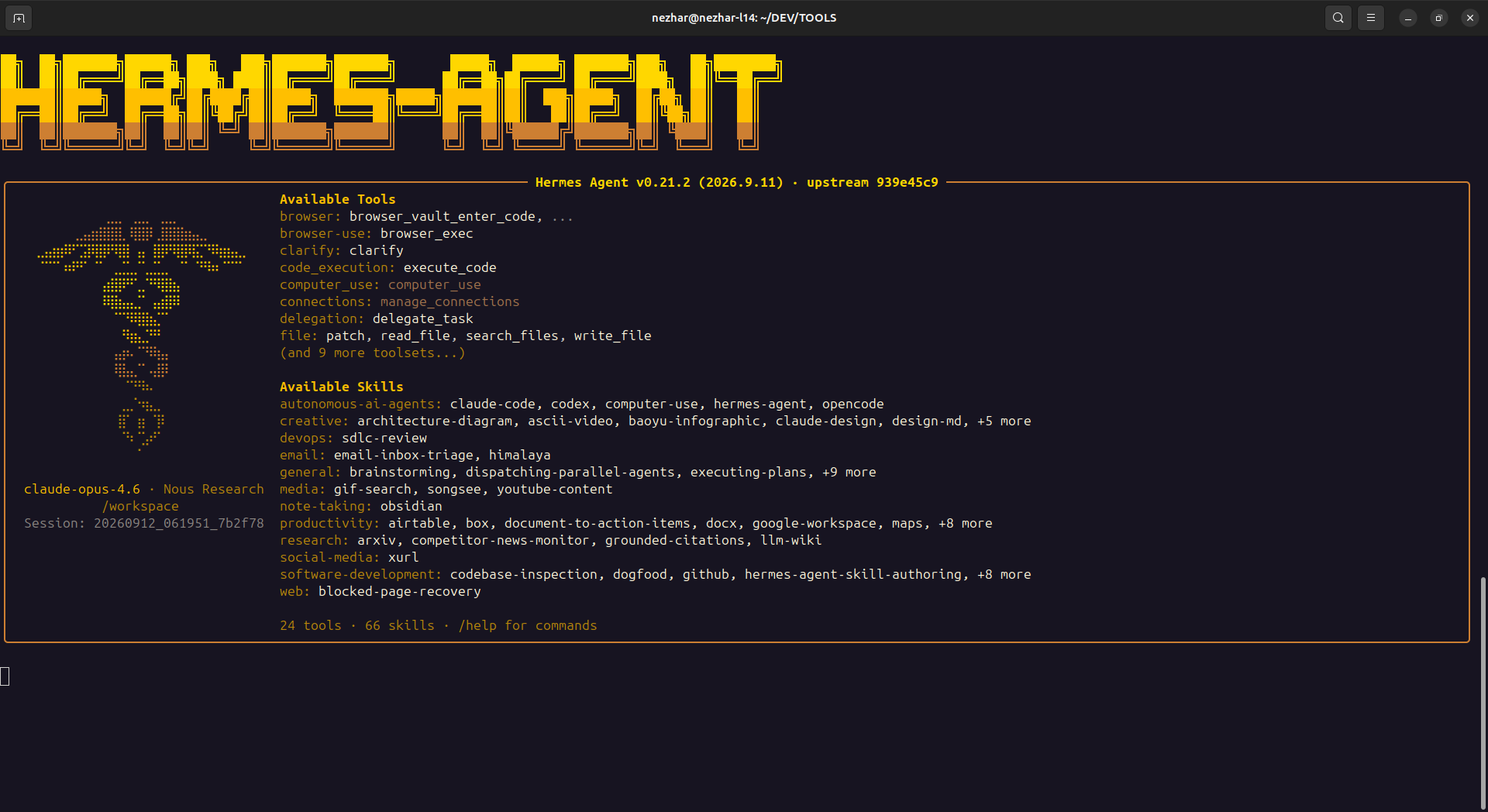
The default
vibepod/hermesimage is built on the officialnousresearch/hermes-agentimage and pins one of its CalVer release tags (v2026.9.7). Upstream no longer publishes to PyPI, so the image tracks the Docker release line instead. Hermes is pre-1.0, sovp runandvp taskprint a developer-preview warning.
First run. Hermes has no usable provider until it is given credentials. Run
hermes setup once inside the container — it persists to the mounted config at
~/.config/vibepod/agents/hermes/, which is the container's /opt/data state
volume. Configure OpenAI-compatible endpoints through Hermes's own provider
setup too.
Global LLM wiring is not supported. Set llm.enabled: false in your
VibePod configuration when running Hermes. Interactive, task, and ACP launches
reject enabled global LLM wiring before starting a container, rather than
silently using a different provider or model. The pinned Hermes runtime
prioritizes saved provider settings, does not use OPENAI_BASE_URL for its
main custom-provider endpoint, and restricts API keys by endpoint host. Its
ACP adapter also has no provider/model launch flags. Hermes-native provider
setup remains supported; VibePod does not rewrite Hermes's saved settings.
Rootless Podman is not supported. The pinned Hermes image needs its own
runtime user and exits before showing any output when launched under
rootless Podman's keep-id user mapping, which VibePod uses for most agents.
On a rootless Podman engine, vp run hermes and vp task create hermes
(affecting interactive, task, and ACP) reject the launch before
starting a container rather than crashing mid-boot. Run Hermes on rootful
Docker or Podman instead.
Headless one-shot:
Write sandbox. Hermes restricts its write_file/patch tools to the
directory prefixes in HERMES_WRITE_SAFE_ROOT. The official image ships
/opt/data alone, which would leave the project mount read-only, so VibePod
sets /opt/data:/workspace. With --acp the workspace host path is appended
too, because editors send absolute host paths. To widen it further, extend the
value rather than replacing it — VibePod appends to whatever you set:
Editor integration. Hermes ships its own ACP adapter as the separate
hermes-acp console script, which the official image already provides, so
vp run hermes --acp works in any ACP editor — see the ACP docs.
Skills. Hermes scans ~/.agents/skills/ only when skills.external_dirs
is set in its config.yaml — there is no environment-variable override — so
the image seeds that key on every start. Skills installed via vp skills are
then mounted at /opt/data/.agents/skills/<id> and picked up automatically.
Editing external_dirs yourself disables the seeding; VibePod never
overwrites a value you set.
IKWID mode. Hermes auto-approves tool calls in YOLO mode, which --ikwid
enables via --yolo: